Secure and AnonymousWhistleblowing System
Give employees a secure way to report concerns with a whistleblowing system that supports two-way messaging, role-based access and clear case documentation.



PRODUCT TOURSee Whistlelink in action - from report to resolution
Explore the reporting portal, secure two-way messaging, and end-to-end case management in a whistleblowing system built for efficient, compliant case handling.
Reporting portal
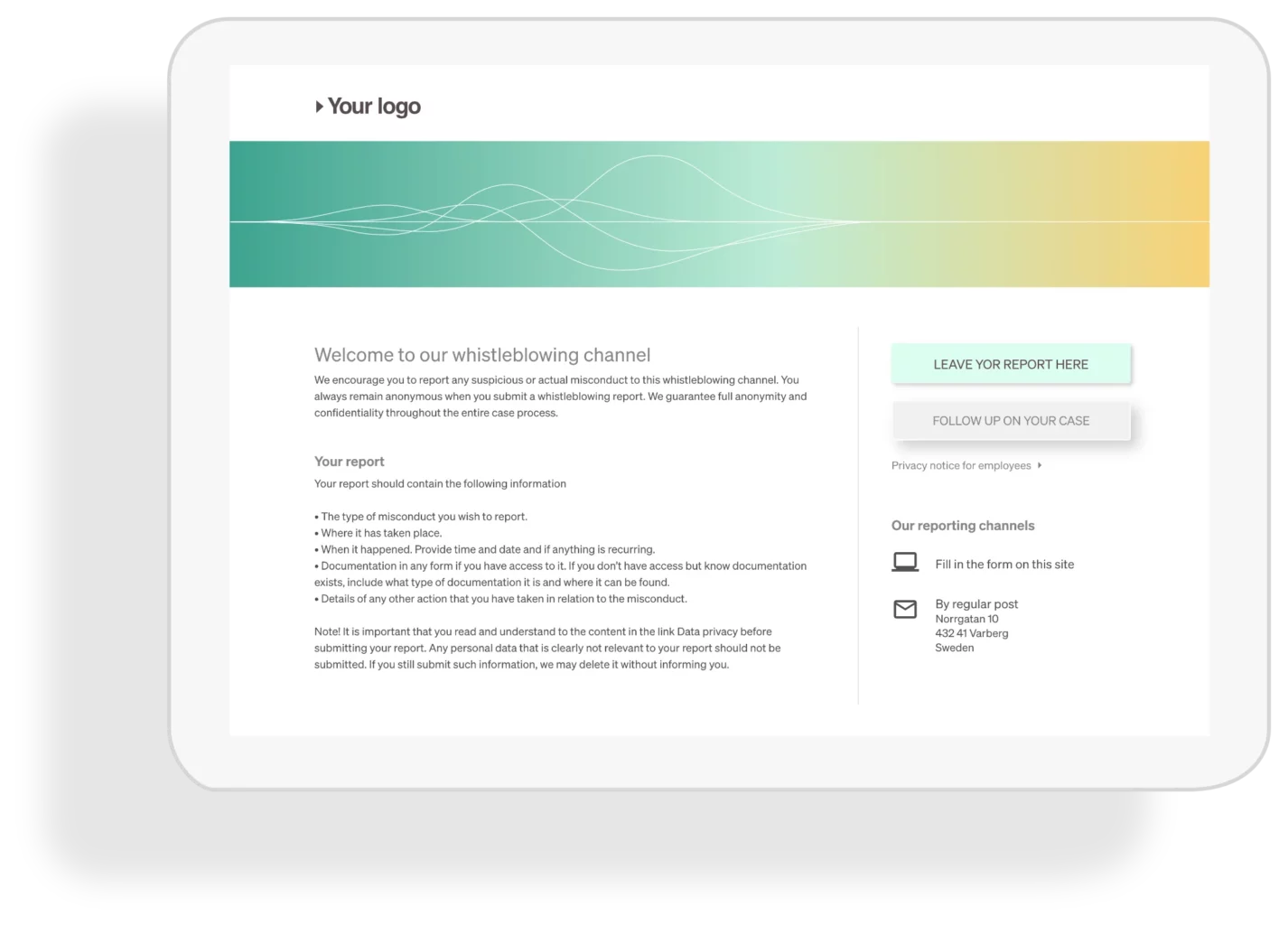
The reporting portal is the page employees and third parties use to submit concerns. It comes pre-built with best-practice content – so you can go live quickly with just a few updates to match your brand and policies.
Customize your page
Add your logo, brand colors, and a header image in minutes. You can also tailor the on-page text to reflect your speak up policy, reporting guidance, and privacy notice – without needing technical help.
Form
The form includes a pre-built question set. Edit, add, or remove questions to match your policy and the types of concerns you expect to receive. Choose from multiple field types to keep reporting clear and consistent.
Voice
Offer a voice reporting option for people who prefer to speak rather than type. With Whistlelink Voice, reporters can leave a secure audio message (up to 10 minutes), making it easier to submit detailed concerns – especially when time is limited.
Reporting channels
On the right side of the reporting page, you can highlight additional ways to report – like a phone line, email address, or in-person reporting – so people can choose the channel that feels most comfortable.
QR Code
Each organization gets a unique QR code you can print and post in key locations. Employees and third parties can scan it to access your reporting portal instantly – no login or URL needed.
Case Management
Whistlelink Case Management helps you handle reports consistently – from intake to resolution – with clear ownership, secure documentation, and audit-ready records.
Overview
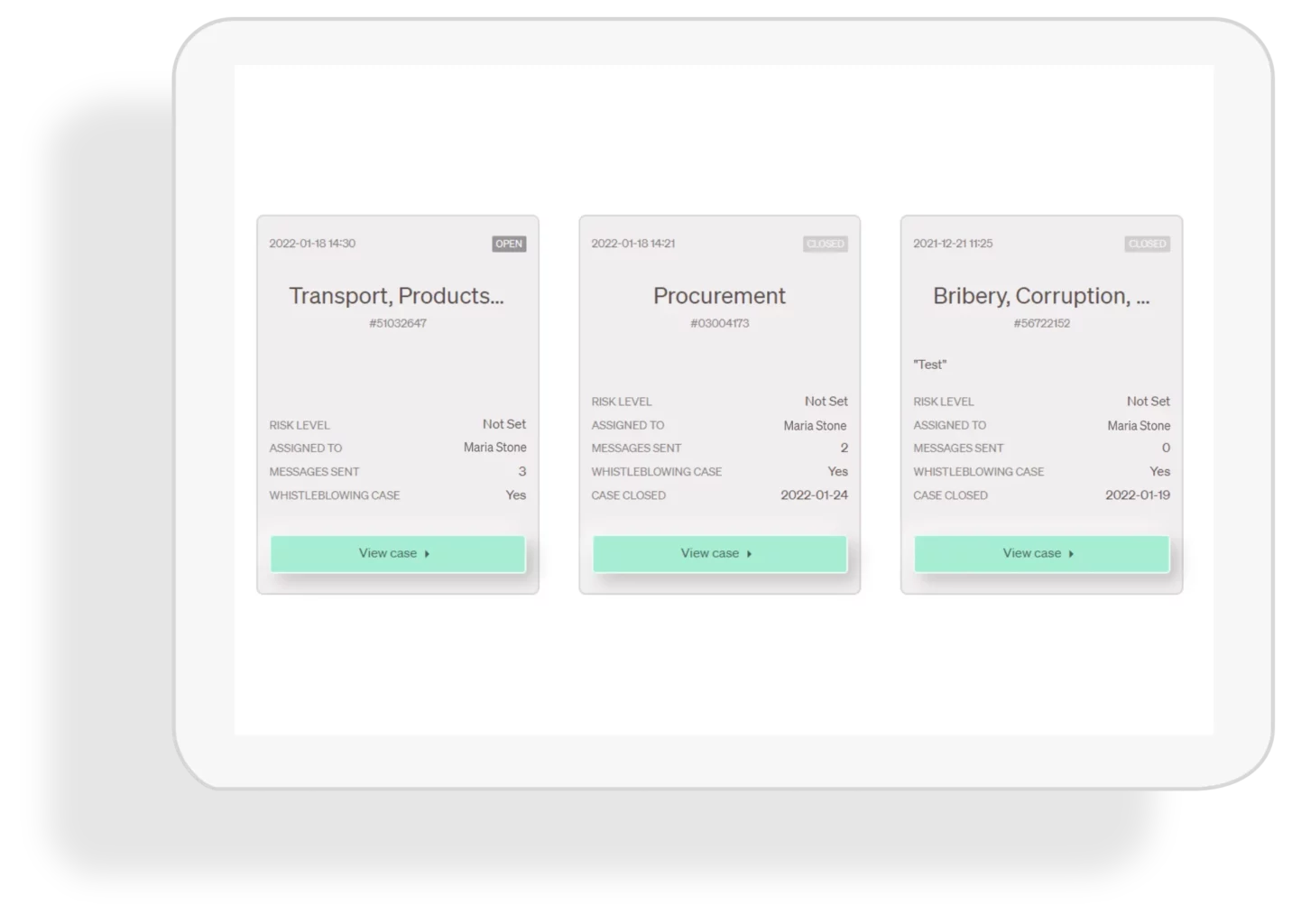
Get a clear snapshot of open and closed cases, assign owners, and jump into any case in seconds – right from your dashboard.
Notifications
Notifications help your team stay on top of every case update – so nothing slips through the cracks. Get alerts by email (and SMS, if enabled) when a report is submitted, a message arrives, or a task is assigned.
Auto assignment
Automatically route new cases to the right handler based on rules you set—like category, location, or business unit – so triage is faster and ownership is always clear.
AI Assistant
Whistlelink’s AI Assistant generates concise case summaries to speed up review and help teams triage faster – while keeping access controlled and data protected.
Multilingual reporting
Translate reports across 50+ languages so global teams can respond faster and handle cases consistently.
Secure two-way messaging
Communicate with reporters through encrypted two-way messaging, with optional anonymity. Templates and auto-replies keep follow-up fast and consistent.
Redacting
Protect confidentiality by redacting sensitive details before sharing a case or exporting documentation.
Analytics
Track trends across reports and cases to spot patterns, strengthen oversight, and share clear insights with leadership.
Security & Privacy
Protecting sensitive reports and case data is core to Whistlelink. We’re ISO 27001 certified and built with security-by-design – so organizations can run an ethics and compliance program with confidence.
Hosting
Hosted in secure environments with encryption, role-based access, and audit logs – built for confidential reporting and compliant case management.
Access control
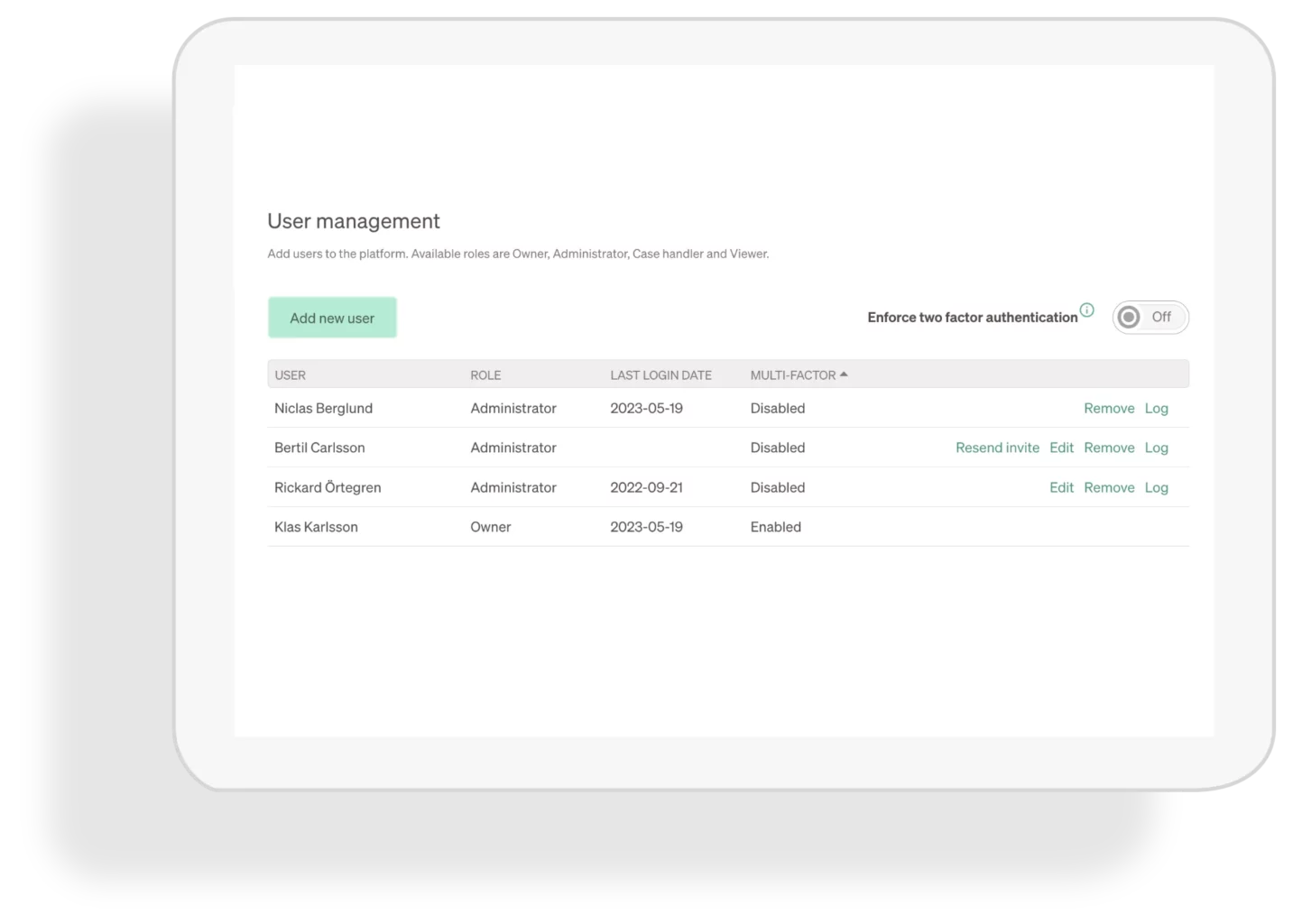
Control who can see what with role-based permissions – so sensitive reports stay confidential from intake to closure.
Single Sign-on
Enable secure, seamless login through your identity provider (IdP). Centralize access management, simplify onboarding/offboarding, and strengthen account security.
Two-factor authentication (2FA)
Add an extra layer of protection to every login. Require 2FA for all users- or enable it for specific roles – to strengthen account security.
Data retention
Closed cases are retained for 12 months by default, and you can adjust retention to match your policy. Set different retention periods per case when needed.
Encryption
Sensitive data is encrypted at rest using AES-256. Encryption keys are managed securely through a Key Management System (KMS).
Partners
Whistlelink is a trusted ethics & compliance hotline and case management platform for partners delivering end-to-end compliance programs – secure reporting, two-way messaging, and audit-ready documentation.
Set up and manage clients in one place
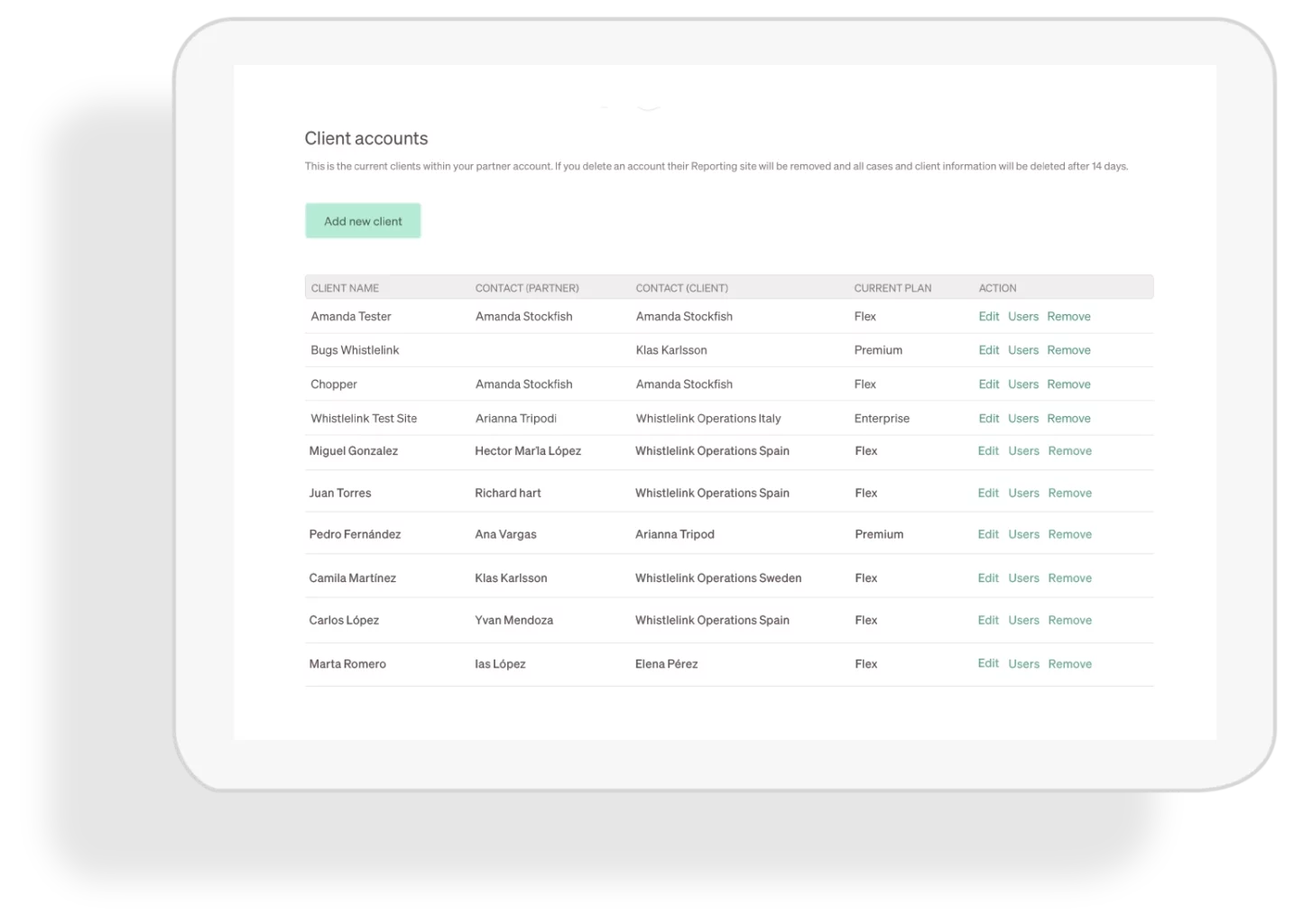
Create and manage client environments in the Partner module. Launch branded reporting portals, assign roles and access, and stay organized across your client portfolio.
Partner branding
Add your brand to the client experience. Upload your logo and apply your brand colors so each reporting portal feels consistent with your organization.
Clone client setup
Clone a reporting portal and intake form, then tailor it as needed. Save time by reusing a proven setup instead of rebuilding each client from scratch.
Trusted by

Frequently asked questions
Do we need an ethics & compliance hotline program in the U.S.?
Many organizations use a hotline program to encourage early reporting, protect employees, and reduce risk. Whistlelink helps you launch a secure reporting portal (web + optional phone) and manage cases end-to-end with clear oversight.
Do you help organizations meet compliance and reporting requirements?
Whistlelink helps organizations run a secure, well-governed ethics & compliance reporting program – supporting confidential intake, two-way communication, case management, and audit-ready documentation.
How do we install Whistlelink?
Whistlelink is a cloud-based solution with no software installation required. Your reporting site is accessible via any browser, and you can be up and running in minutes.
Does Whistlelink offer onboarding services?
Whistlelink is very easy to use and implement. We provide standard onboarding resources (webinars, documentation) included in the subscription. If you require additional, personalised support, we offer further onboarding services on request.
How many languages is Whistlelink available in?
Whistlelink supports more than 50 languages. You can configure multiple languages for your reporting site depending on your organisational needs.
How can I submit a report?
Whistlelink offers multiple secure reporting channels, both written and oral. Reporting persons can:
Fill in a structured web questionnaire
Record a voice message directly on the platform
Use a traditional phone hotline (optional add-on)
Does Whistlelink support anonymous reporting?
Yes. Whistlelink enables completely anonymous and confidential reporting, in full alignment with whistleblower protection laws.
Does Whistlelink have a hotline?
Yes. In addition to web and voice message options, Whistlelink offers a phone hotline that can be included based on your organisational requirements.
How can I safely communicate with the reporting person?
Whistlelink includes secure, two-way communication with the reporting person, even when they choose to remain anonymous. This allows for follow-up, clarification, and updates throughout the process.
How many users/accounts can I have?
Whistlelink adapts to your organisation’s size. The number of admin users is based on your needs and the size of your workforce, for scalability.
Can we customize the reporting form and case handling process?
Yes. Whistlelink allows full customization of your reporting site, from branding to reporting categories and texts. You can configure the case management system to reflect your internal processes.