Important update: Smarter case assignment with full transparency
We’ve launched an important update to bring you greater control over how cases are assigned and who can access them right from the moment a case is received.
With the new dynamic assignment rules, case access is now visible, customisable, and aligned with your internal governance structure.
What’s new?
Previously, Owners and Administrators had automatic access to all cases, even when not explicitly assigned. This wasn’t always visible in the case view, leading to uncertainty about who could access what.
Now, access is clearly defined through automation rules, making assignments transparent and auditable.
How it works:
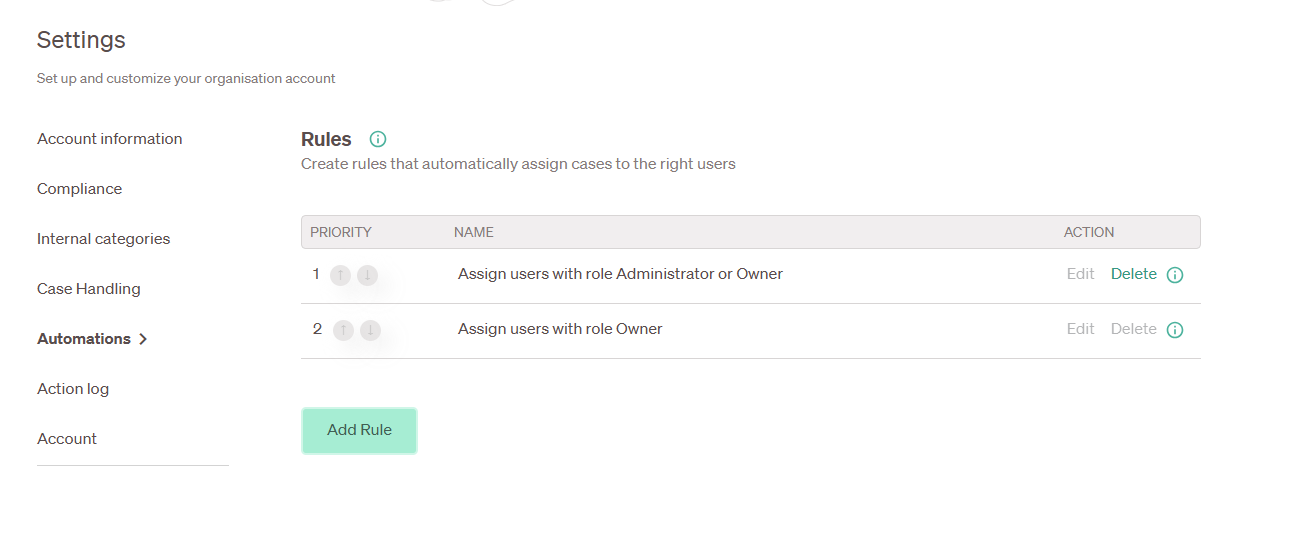
You can now configure automatic assignment rules under Settings → Automation rules. Here’s how it works:
- Choose a report element
Select the element that will trigger the rule, for example, Country or Business Unit. - Define conditions
Each rule must include at least one condition that a case must meet for it to be assigned. - Select assigned users
Choose which users should be assigned to the case when the conditions are met. - Set rule priority
Arrange rules in the preferred order using arrows to set their priority. The first matching rule will be applied. - Unmatched cases
If no rule matches, the case will remain unassigned and an automatic email notification will be sent to all Owners.
By default, we’ve added two automation rules that assign both Owners and Administrators to new cases. This ensures the same access as before, but now fully visible in the case view.
What you need to do:
To support this update, the default case access for Administrators has been restricted as of 22 December:
- For cases received before 22 December
If Administrators still need access, an Owner must manually assign them. - For cases received after 22 December
No action is needed to retain current behaviour — the default automation rules will apply automatically.
Customise assignment rules to fit your workflow:
You can create your own rules to reflect your organisation’s internal structure and reporting logic. This allows greater flexibility in managing case access, distribution, and compliance.
Key benefits:
- Greater clarity over who has access to each case
- Supports compliance and internal governance policies
- Automates distribution of cases based on your defined criteria
- Increases visibility for Owners and Administrators